
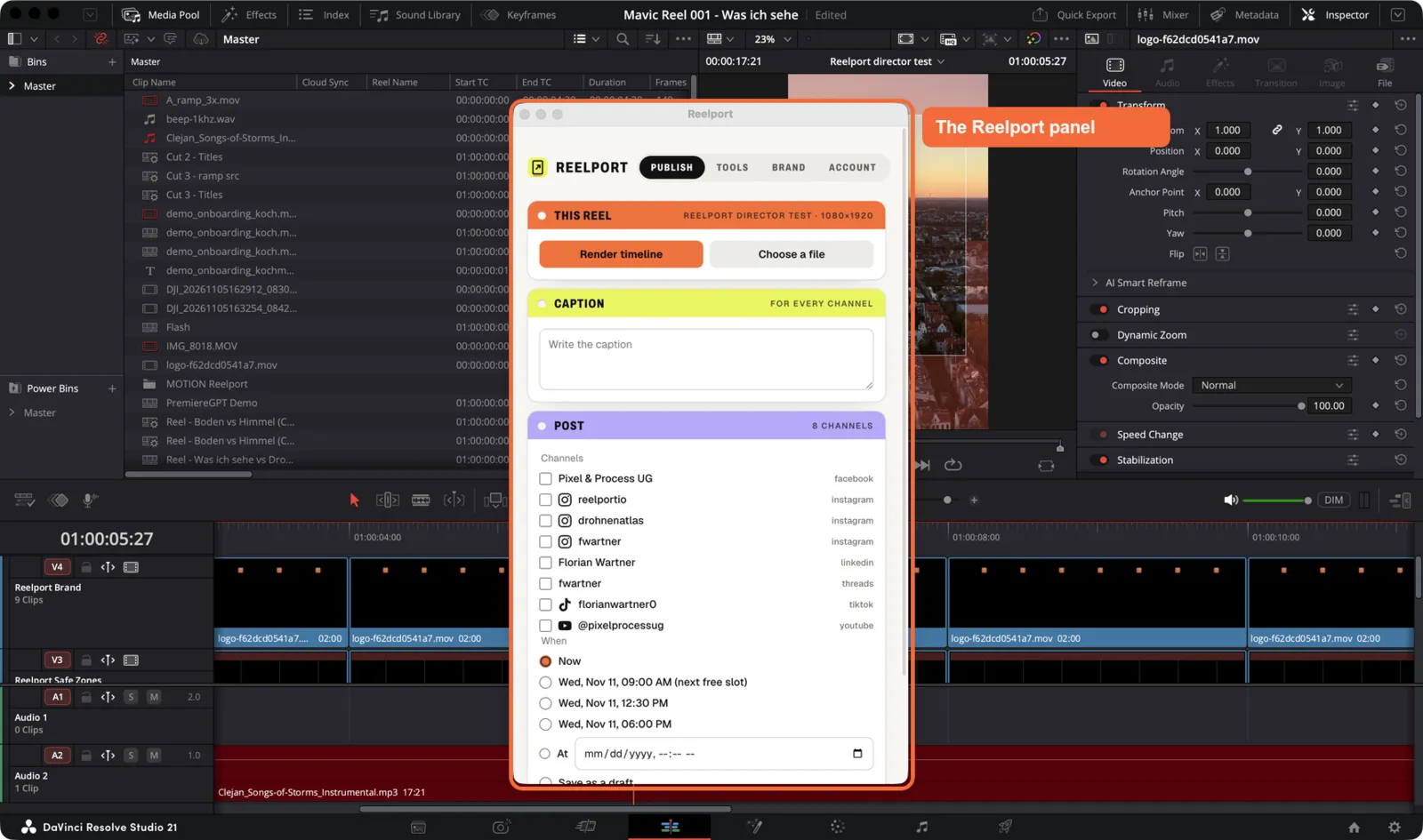
The Reelport plugin brings reelport.io into DaVinci Resolve Studio and into Claude. You edit and render in Resolve, then schedule or publish the reel to your reelport.io channels without leaving it. Claude can do the editing for you: it cuts talking-head videos in five editing styles, builds reels from any footage, adds captions, titles and colour, and posts the result.
What's in the download
One download has three parts. The installer sets up all of them.
| Part | What it does | Where you use it |
|---|---|---|
| Resolve panel | Renders the open timeline (or a file you pick) and publishes or schedules it. It also has one-click editor tools and your brand kit. | DaVinci Resolve Studio › Workspace › Workflow Integrations › Reelport |
Claude extension (Reelport.mcpb) |
Gives Claude the Reelport tools: it can read your footage, edit inside Resolve, render and publish. | Claude Desktop, any chat |
Claude plugin (Reelport.plugin) |
The /reelport and /reelport-capcut skills, which walk Claude through a whole edit with clickable menus. |
Claude Desktop › Customize › Plugins |
The panel works on its own. The Claude parts are optional, but they do most of the editing.
Requirements
- DaVinci Resolve Studio 20 or later. The free version of Resolve doesn't work: it has no Workflow Integrations and blocks external scripting.
- In Resolve › Preferences › System › General, External scripting using set to Local. Restart Resolve after changing it.
- macOS 13 or later (Apple silicon or Intel), or Windows 10 (1809+) or 11. On Windows, Resolve's scripting also needs 64-bit Python 3.10 or later. See Windows and Linux.
- A reelport.io account with an active plan or trial. There's no separate licence. See Plans and limits.
- For the Claude parts: Claude Desktop, signed in.
- For editing in CapCut instead of Resolve: the international CapCut desktop app 9.x. See Editing in CapCut.
Footage has to be on your computer or on a drive that's plugged in. Resolve can't open files attached to a Claude chat.
How it fits together
- You edit in Resolve, or Claude edits for you (in Resolve, or in your CapCut project).
- The panel or Claude renders the timeline: H.264 MP4 with AAC audio, sized for the platform.
- The file is uploaded to your reelport.io team. reelport.io posts it now or at the time you pick, from our servers, so you can close Resolve.
- Results and insights show up in reelport.io, on the queue and the calendar.
Where to go next
- Install the plugin: download, installer, permissions and sign-in.
- The Resolve panel: every tab and control.
- Editing with Claude: add Reelport to Claude and run your first edit.
- Editing styles, Director mode and Editor tools: what Claude and the panel can do.
- Render, publish and schedule: platform options, including TikTok's.
- Claude tool reference: every tool the extension adds.
- Plugin FAQ and privacy: what's sent where,
diagnose, release notes.